
Table Management
Booking Notification Management
The “Reservation Notifications” module allows full control over the automated messages that the system sends for different events related to reservations, customers, and payments. Through it, the administrator can define when, what, and through which channels messages are sent, as well as edit their content using dynamic variables.
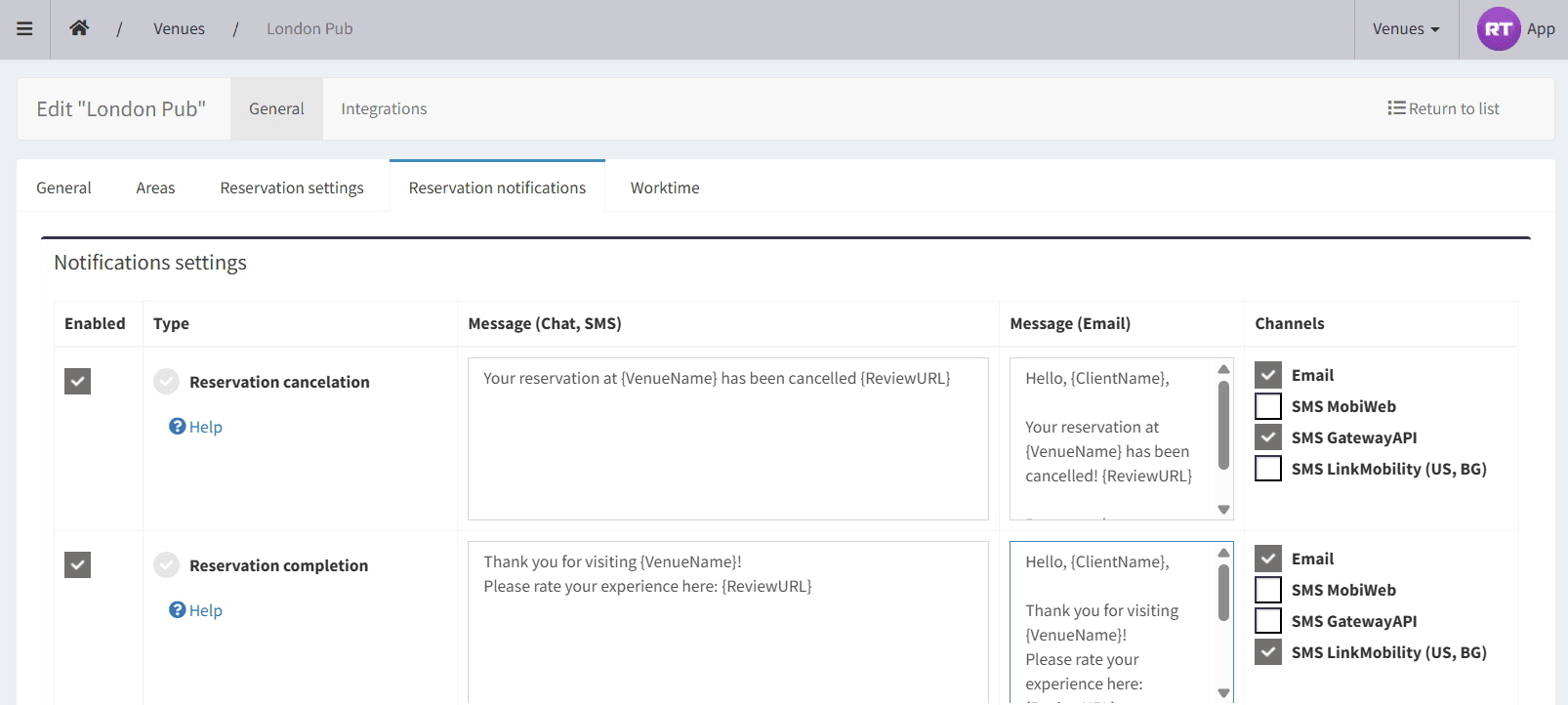
Administration → Venues → Edit Button → “Reservation Notifications” tab
Here you configure all message templates (SMS/Email/WebPush) that the system sends automatically for various events in the booking process.
# What is the notifications table?
**1) Enabled**
✔ enabled — the system sends this notification when the event occurs
☐ disabled — the event is ignored (nothing is sent), regardless of selected channels
**2) Notification Type**
This is the event that triggers the message.
Under each type there is a Help icon — clicking it provides additional details about the event.
**3) Notification (Chat, SMS)**
This field contains the SMS text, if the SMS channel is enabled.
Important:
- SMS is a paid channel, according to the customer’s mobile operator pricing.
- Every 160 Latin characters or 57 Cyrillic characters are billed as one SMS. If even one character is Cyrillic, the entire SMS is counted as Cyrillic.
- If the text is long, the system shows a warning (for example “you will be charged for 2 SMS”), because billing depends on message length.
- The system supports multiple SMS providers. For Bulgaria, the LinkMobility channel currently offers the best prices.
**4) Notification (Email)**
The Email template, if the Email channel is enabled.
Email is a free channel and allows longer and clearer communication.
**5) Channels**
Defines through which channels the message is sent for this trigger:
- Email (free)
- SMS MobiWeb (paid)
- SMS GatewayAPI (paid)
- SMS LinkMobility (US, BG) (paid)
- WebPush / WebPush OneSignal (push notifications to staff/devices — depending on configuration)
**Important: a message is sent only when BOTH are true:**
“Enabled” = ON
At least one channel is selected
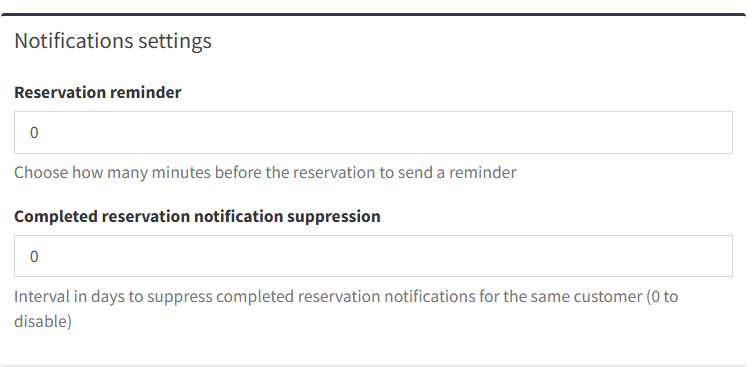
**Additional settings available below:**
“Reservation reminder (minutes before)” — how many minutes before the reservation time to send a reminder
“Completed reservation notification suppression” — number of days to avoid sending repeated “Completion” notifications to the same customer (prevents spam)
“Notification Variables ” — placeholders (e.g. {VenueName}) automatically replaced with actual values such as customer name, reservation date, etc.
# All Notification Types - when they are sent and to whom
1. Reservation Cancellation
Sent when a reservation is cancelled after being created.
Recipient: customer (Email/SMS).
Purpose: inform the customer that the reservation is no longer active.
2. Reservation Completion
Sent when a reservation is marked as completed / visit finished.
Recipient: customer (Email/SMS).
Purpose: collect feedback and rating via {ReviewURL}.
Important: long SMS warning may appear → possible billing for multiple SMS segments.
3. Reservation Confirmation
Sent when the reservation is confirmed by the venue/system.
Recipient: customer (Email/SMS).
Purpose: assures the customer the reservation is accepted, including date/time ({ReservationDateTime}).
4. Reservation Expiration
Sent when a reservation expires — typically when not confirmed within time limits.
Recipient: customer (Email/SMS).
Purpose: notify that the reservation is no longer valid.
5. Reservation Rejection
Sent when the reservation is rejected by the venue.
Recipient: customer (Email/SMS).
Purpose: official refusal notification.
6. Reservation Reminder
Sent a configured number of minutes before the reservation time.
Recipient: customer (Email/SMS).
Purpose: reduce no-shows and improve planning.
7. Reservation Creation
Sent when a staff member creates a reservation.
Recipient: internally to staff (WebPush OneSignal).
Purpose: real-time internal notification.
8. Customer created reservation
Sent when a customer submits a reservation request pending confirmation.
Recipient: venue/staff (Email/SMS/WebPush).
Purpose: prevent missed requests and speed up confirmations.
9. Reservation Removal
Sent when a staff member deletes a reservation.
Recipient: internal (WebPush OneSignal).
Purpose: transparency and audit trail ({UserName}).
10. Reservation Modification
Sent when a staff member edits a reservation.
Recipient: internal (WebPush OneSignal).
Purpose: change tracking and control.
11. Customer modified reservation
Sent when a customer edits their own reservation.
Recipient: venue/staff (Email/SMS/WebPush).
Purpose: allow timely response to changes.
12. New Payment
Sent when a deposit/payment is initiated.
Recipient: customer (Email/SMS).
Purpose: inform about due amount ({PaymentAmount}) and provide payment link via {ReservationURL}.
13. Succeeded Payment
Sent after a payment is successfully received.
Recipient: customer (Email/SMS) and/or internally to staff (if WebPush enabled).
Purpose: confirmation and accountability.
----------------------
# Text Variables - what they mean
Variables are placeholders automatically replaced with reservation/venue data:
{ReservationTime} Time of Reservation
{ReservationDate} Date of Reservation
{ReservationDateTime} Date and Time of Reservation
{ReservationShortDate} Date and Time of Reservation
{ReservationPeople} Reservation party size
{ReservationTable} Reservation tables
{ReservationComment} Reservation comment
{ReservationToken} Reservation Token
{ReservationURL} Reservation public URL
{ReviewURL} Link to leave a review
{MarketingOptInURL} Link to subscribe to marketing messages
{VenueName} Venue name
{VenuePhoneNumber} Venue phone number
{VenueEmail} Venue E-mail
{ClientName} Customer Name
{UserName} Username
{PaymentAmount} Payment amount
**Important:**
SMS cost - keep SMS templates short. If the system shows “2 SMS”, you pay double per notification.
SMS balance - visible on the Admin Dashboard. You will be notified when it gets low. It is topped up manually.
We distinguish customer notifications vs internal notifications:
- customer: Confirmation / Reminder / Cancel / Review / Payment
- internal: Created / Modified / Removed / Client Modified
Use {ReviewURL} only where appropriate (usually on “Reservation Completion”).
Proper notification management turns the booking system into an automated communication channel between the venue and the customer — reducing missed reservations, improving customer experience, and maximizing feedback value without extra cost or manual work.
# General Venue Information
The “General Information” section is located at:
**Settings → Venues → Edit Venue → Basic → General **
It contains the core venue settings used across the entire booking system — reservations, notifications, payments, working hours, and reports. Correct configuration is CRITICAL for stable and predictable behavior.
**Name**
Displayed in:
- customer messages (Email and SMS)
- system notifications
- reservation and feedback pages
The value is used in text variables such as {VenueName}.
**Country**
Used for:
- determining available SMS providers
- phone number validation and formatting
- applying local rules and regulations
**Currency**
Used for:
- payments and deposits
- displaying amounts in emails and SMS
- populating {PaymentAmount}
**Time Zone**
All of the following depend on the time zone:
- reservations
- reminders
- notifications
- automated events
- Incorrect time zone may cause:
- reminders at wrong time
- incorrect dates/times in messages
**Template**
Defines only the visual layout of the venue floor plan:
- table appearance
- colors, shapes, styles
- layout and scaling
It does NOT affect booking logic or availability.
**Opens At**
Used for:
- limiting bookable time slots
- customer interface display
- validation when creating reservations
**Closes At**
Used to:
- prevent reservations outside working hours
- calculate correct end times
- manage night intervals (if enabled)
The “General Information” section defines the venue’s identity, time logic, and key operational parameters. All other modules rely on these settings — they must be configured carefully from the start.
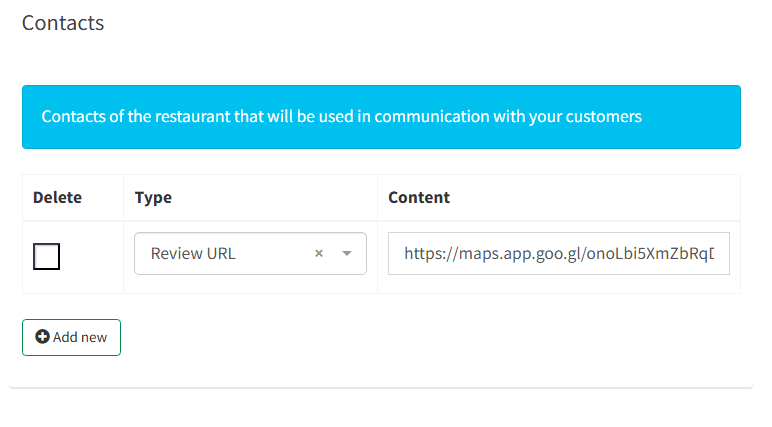
# Venue Contacts
The “Contacts” section is also located under
**Settings → Venues → Basic**
These contact details are actively used in:
- notifications
- emails and SMS
- feedback pages
- integrations
## **Available Contact Types**
**Phone**
Used for:
- customer interfaces
- customer communication
- text variable {VenuePhoneNumber}
**Email**
Used for:
- official contact email
- email communications
- system messages
**Website**
Used for:
- public venue information
- quick access from customer pages
**Address**
Used for:
- location display
- customer orientation
- Google/Maps integrations
**Review URL**
The most important field for rating management.
Represents:
- direct link to Google review page
- Used in:
- SMS
- Emails
- feedback pages
{ReviewURL} variable
Without a Review URL:
- customers will not be redirected to Google
- no public reviews will be collected
“score > 8 → Google” logic will not work
**Coordinates**
Used for:
- precise geolocation
- future maps, navigation, and integrations
 App Store
 Google Play
 Web App
Have questions?