
Booking Channels
Google Maps and Google Search Integration
# The integration with Google allows:
✔ receiving online reservations directly from Google Maps
✔ receiving reservations from Google Search
✔ synchronizing working hours and available booking slots
For the integration to work correctly, it is necessary to first enter the venue’s contact details accurately.
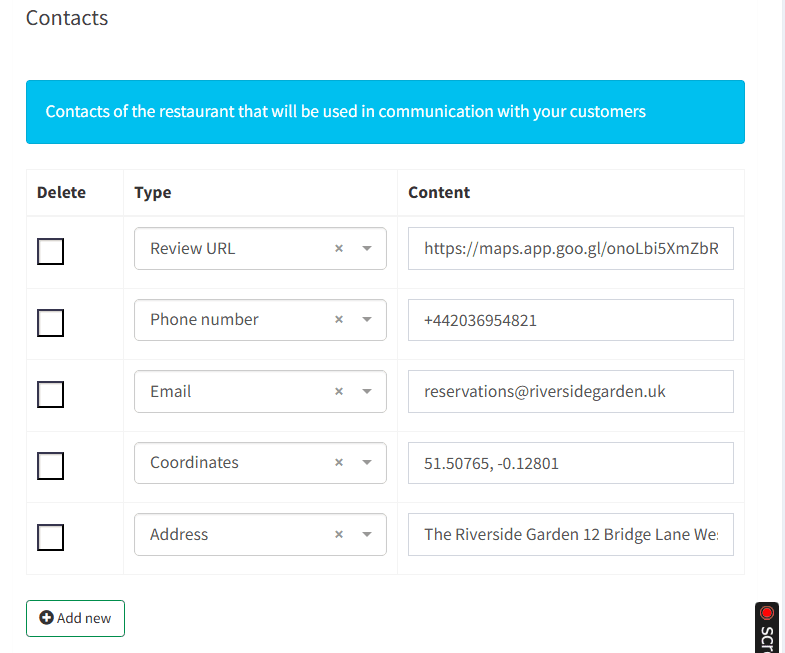
## Entering the venue contact details
Access path:
👉 Menu → Venues → General
There you will find the Contacts section.
The following fields must be filled in:
Required fields
✔ Review URL (link to the Google Business profile)
✔ Phone number
✔ Email
✔ Coordinates
✔ Address
## Where to get the coordinates from
The coordinates are copied directly from Google Maps:
1️⃣ Open the venue in Google Maps
2️⃣ The coordinates are visible in the browser address bar
3️⃣ Copy the numeric values
Example format:
51.50765, -0.12801
They are entered into the Coordinates field.
## Why it is important that the data is filled in correctly
Accurate data ensures:
✔ correct linking of the venue with the Google profile
✔ correct address and location display
✔ avoiding duplicated venue records
✔ accurate directions for customers
✔ preventing reservation assignment errors
**Very important rule**
The venue name in Reservation.Tools must be exactly the same as the name in Google.
This includes:
- capital and lowercase letters
- spacing
- symbols
- dashes / hyphens
Because Google matches the profile based on:
✔ name
✔ coordinates
✔ address
If one of these does not match, the integration may fail.
## Activating the integration
After the contact details have been entered:
1️⃣ Open the Integrations menu
2️⃣ Select Reserve with Google
3️⃣ Click Activate
After activation, the following options become available:
- working hours settings
- reservation synchronization
- zone / area integration (if applicable)
What happens after activation
Customers can now make reservations:
✔ directly via Google Maps
✔ via Google Search
and all reservations:
✔ enter the system automatically
✔ follow the working hours and rules
✔ are available for tracking and reporting
**Recommendation**
Before activating the integration:
✔ check the working hours settings
✔ configure exceptions if needed
✔ make sure the reservation form is working
✔ create a test reservation
This ensures a smooth connection between:
🔗 Reservation.Tools
🔗 Google
🔗 Your venue
 App Store
 Google Play
 Web App
Have questions?